Making corporate actions easier to follow
Making corporate actions easier to follow
During my time at Mandiri Sekuritas, I worked on the Calendar experience in Growin’: discovering corporate actions, browsing dates and categories, and reviewing event details.
During my time at Mandiri Sekuritas, I worked on the Calendar experience in Growin’: discovering corporate actions, browsing dates and categories, and reviewing event details.
Design focus: connect Home, date navigation, event categories, and contextual details in one readable mobile journey. The selected screens also cover empty, error, and light/dark states.
Design focus: connect Home, date navigation, event categories, and contextual details in one readable mobile journey. The selected screens also cover empty, error, and light/dark states.
Home · Upcoming corporate actions

Discover events from Home
Discover events from Home
The Corporate Action section brings upcoming events into Home. Each row pairs a stock with an event stage, date, and supporting value; the All Events link opens the dedicated Calendar destination.
The Corporate Action section brings upcoming events into Home. Each row pairs a stock with an event stage, date, and supporting value; the All Events link opens the dedicated Calendar destination.
Upcoming, IPO, Dividend, and Stock Split chips provide an entry point by event type. The calendar remains one step away through All Events.
Upcoming, IPO, Dividend, and Stock Split chips provide an entry point by event type. The calendar remains one step away through All Events.
Calendar · Upcoming events

Calendar · Dividend filter

Browse by date and event type
Browse by date and event type
I organized the Calendar around a selected date and event-type filters. Colored dots show the categories on nearby dates, while chips narrow the list to a particular corporate action.
I organized the Calendar around a selected date and event-type filters. Colored dots show the categories on nearby dates, while chips narrow the list to a particular corporate action.
The general view groups event stages in a readable list. The dividend view switches to a table so dividend values and related fields can be compared across stocks.
The general view groups event stages in a readable list. The dividend view switches to a table so dividend values and related fields can be compared across stocks.
My events · Account-related events
Dividend · Event details

Connect the list to the details
Connect the list to the details
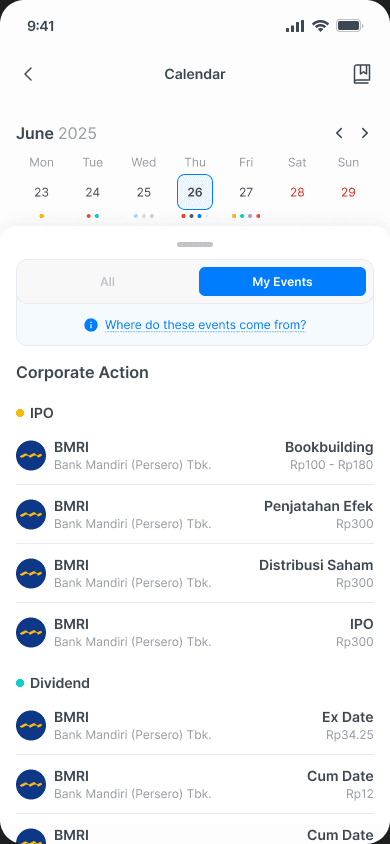
My Events gives account-related events their own view. Opening a dividend exposes its value and key dates in a bottom sheet, keeping the calendar context visible behind the detail.
My Events gives account-related events their own view. Opening a dividend exposes its value and key dates in a bottom sheet, keeping the calendar context visible behind the detail.
The detail separates dividend amount, estimated yield, and close price from recording, cum, ex, and payment dates. The source-information link in My Events provides a route to understand where its events come from.
The detail separates dividend amount, estimated yield, and close price from recording, cum, ex, and payment dates. The source-information link in My Events provides a route to understand where its events come from.
Empty state · No corporate action

Error state · Reload
Design for the days without results
Design for the days without results
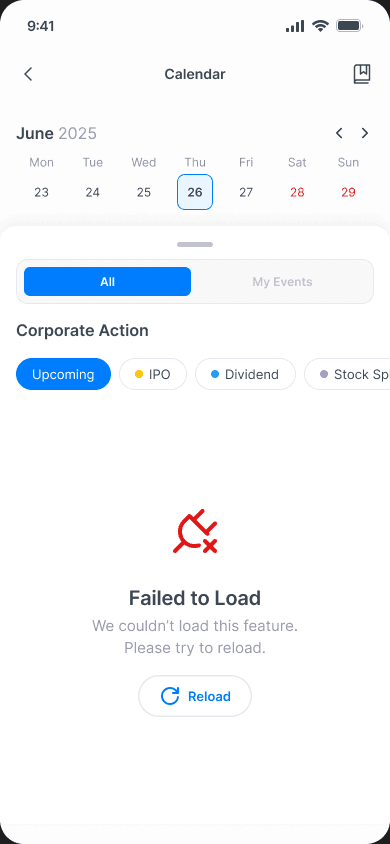
I designed separate states for a date with no corporate actions and a request that failed to load. In both cases, the date and filters stay visible so users keep their place.
I designed separate states for a date with no corporate actions and a request that failed to load. In both cases, the date and filters stay visible so users keep their place.
The empty state directs users to another date. The error state provides a Reload action. Distinguishing those messages avoids treating a failed request as an empty calendar.
The empty state directs users to another date. The error state provides a Reload action. Distinguishing those messages avoids treating a failed request as an empty calendar.
Right issue · Light mode

Right issue · Dark mode

The same structure in light and dark
The same structure in light and dark
The theme comparison uses the same Right Issue view in both modes. Date selection, category chips, table columns, and event colors stay in the same places as the surfaces and text treatment change.
The theme comparison uses the same Right Issue view in both modes. Date selection, category chips, table columns, and event colors stay in the same places as the surfaces and text treatment change.
One connected calendar experience
One connected calendar experience
This selection follows the journey from a Home entry point into dated event discovery, personal context, and dividend details. Supporting states and matched theme variants show how the experience continues beyond the default screen.
This selection follows the journey from a Home entry point into dated event discovery, personal context, and dividend details. Supporting states and matched theme variants show how the experience continues beyond the default screen.